
The best focus app for designers? Find inspiration, then make something.
The reference board looks wonderful. Your own canvas is still empty. You came looking for a useful direction, but every example suggests another thing to explore. Meoz is a personal AI focus companion for designers and creative professionals on Mac, helping you keep a chosen goal in view while you research, make and revise.
Inspiration needs room—and a question
A designer cannot simply stop looking at things. A motion reference, an interaction example or an unfamiliar technique can change the work for the better. The problem is losing track of what you wanted to learn from them.
Try giving the browsing session a question: Find three examples of readable navigation for a dense dashboard. Compare them against the brief. Save what each example teaches you, rather than just collecting images you like. You now have a reason to stop browsing and try a direction.
Exploring and choosing belong to the same process
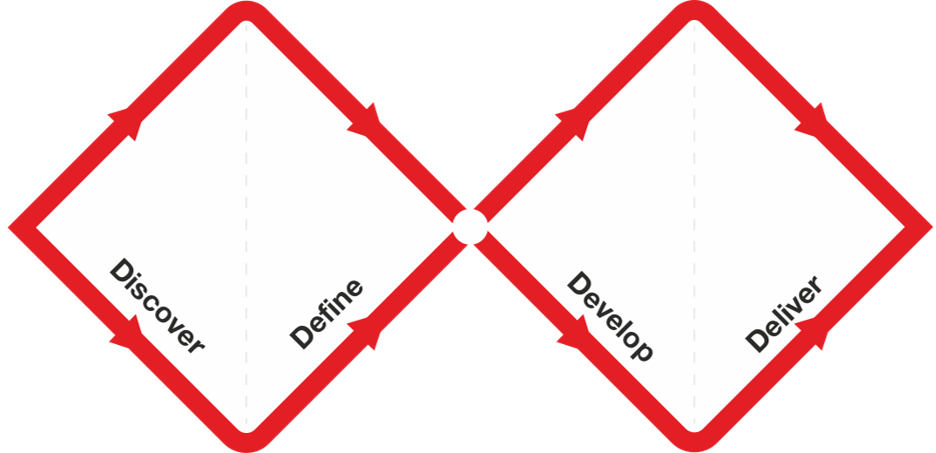
The Design Council's Double Diamond describes a process that opens up possibilities and then narrows them toward a defined problem and tested solutions. Exploration has a purpose; it is not a failure to produce something immediately.
For your next session, decide which kind of work you are doing. Are you learning about the problem, sketching alternatives or checking a solution? Name that work in Meoz's goal. The app does not choose your design direction; it helps you remember the direction of the session.
The detours that look almost like design work
The endless reference hunt: you find a suitable layout, then keep browsing because a better one might be next. Pick the strongest few and write down what you will test. Let a rough version answer the next question.
The tutorial chain: you need one animation technique, but the next video offers a complete new workflow. Pause the video when you have enough to attempt the effect. If the attempt fails, return with a specific question.
The comparison spiral: you start checking someone else's portfolio and end up feeling that your own work is behind. Bring the task back to the brief: what does this client or user need from the next version? Your session does not need to settle where you stand in an entire industry.
Keep creative tools available; configure reference sites deliberately
Meoz uses available browser context and your goal to assess eligible browsing. Some destinations and feed types also follow explicit rules. Do not assume every inspiration feed will be treated as goal-relevant merely because you are designing.
If you need a reference platform, check your settings before a focused block and use the available appeal controls when appropriate. An explicit block or a lock may restrict what you can change. Start with a flexible session while you learn how Meoz handles your references.
Meoz does not inspect your Figma layers, judge a Photoshop composition or know whether a Blender render is good. Native-app monitoring is a separate control with nudges and an option to hide selected apps, not visual understanding of the canvas. Tool names here describe your workflow, not integrations.
Try a session that ends with two options
Set a goal such as Sketch two layouts for the product detail page. Open the brief and the references you already chose. Start a Focus Session and make a rough first option before searching again.
When you want to browse, name the missing decision: spacing, hierarchy, interaction or a technical limitation. Find enough to test it, then return to the canvas. At the end, compare your two options against the brief and leave one note about what to refine next.
You may discover that neither option works. That is still useful if it tells you what to change. Meoz is there to support staying with the process, not to turn creative quality into a timer score.
A softer presence beside demanding work
Creative feedback can already be sharp. You may prefer a small, friendly companion to another interface that feels like supervision. Meoz's cat, Goal banner and Sayings can be adjusted or hidden so they suit your workspace.
Choose gentle reminders or firmer protection as needed. Take deliberate breaks and leave a clear return point. The aim is to make returning to your own work feel possible, even when the first version is disappointing.
Choose a setup that fits the project
Meoz runs on macOS 14 or later. Free includes AI with your own key (BYOK), subject to your provider's fees and limits. Free also includes up to 20 custom allow-list entries; Pro adds custom block lists and app-list customization, alongside managed AI and other premium controls.
For unreleased client work, check the privacy policy and your agreement before using cloud AI. Relevant goal and browser context can leave your device; focus analytics stay on your Mac. A compatible local provider is another option.
Try Meoz while making one real thing: a layout, a storyboard or a small interaction. Keep the settings comfortable, notice whether reminders help, and decide from that experience. A useful companion should leave you with more room for your own work.
Meoz or a website blocker when inspiration is part of the job?
A blocklist is useful when the boundary is already clear. Freedom lets you choose websites and apps to block. For a production-only session with references already collected, deciding in advance what stays closed can keep the setup simple.
Exploration is less tidy. You might need a tutorial to solve one animation problem, then find yourself watching unrelated work because it looks impressive. Meoz's goal-aware browser assessment gives that session another point of reference: the brief you are trying to satisfy. Its friendly companion and visible goal can help make the return to an imperfect draft feel more inviting.
Choose Meoz when you want a reminder of what you came to make, alongside configurable protection. Do not assume every inspiration feed will be allowed: social feeds, explicit block rules and other dedicated safeguards can follow different policies. Meoz also cannot inspect your Figma layers or decide whether a layout is good. Try it with “Create two navigation options for this brief.” Keep the setup that helps you turn references into decisions, without losing the exploration the work needs.
Try Meoz beside your next design
About this guide
A Meoz-authored guide with illustrative creative workflows. This is not an independent ranking or evidence that Meoz improves design quality. Named design tools and the Design Council do not endorse Meoz.
Keep reading
Use Meoz's Free AI with your own key (BYOK)
What BYOK includes in Meoz Free, how to get started, and how provider costs and privacy differ from Pro.
Read article → GuidesGoal-aware AI and website blockers: when to use each
How goal-aware classification, focus blocklists and system-wide network protection work together in Meoz.
Read article → GuidesThe best focus app for remote work? Finish something before the next call.
Meoz helps remote workers and freelancers protect a concrete task on Mac—with flexible sessions, a friendly companion and boundaries you choose.
Read article →